


Hunt Windows Shell CVE-2026-96951 without an IOC

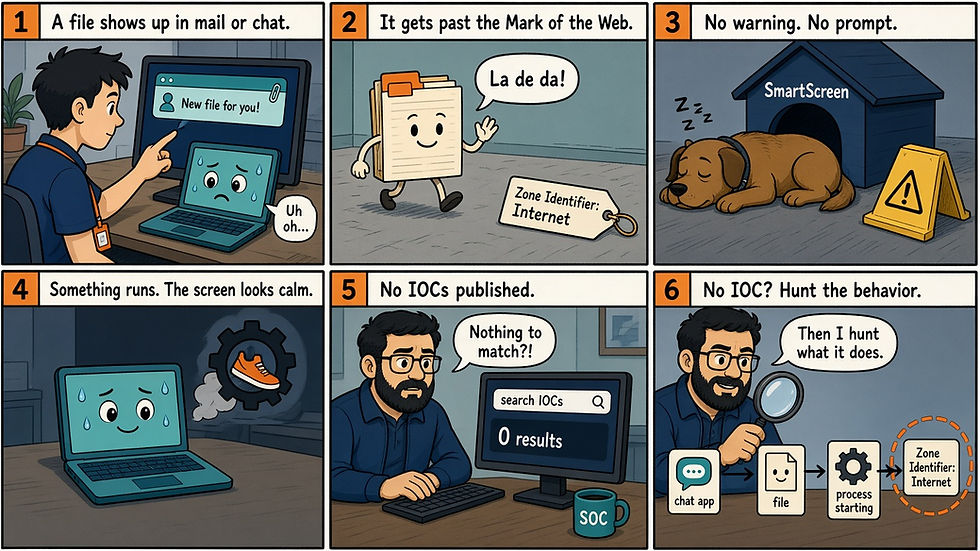
Picture someone in finance opening a file that arrived in a chat message. There is no yellow bar, no "this file came from the internet" prompt and no SmartScreen warning. If something runs next, nothing on the screen tells them, and nothing tells you either.
Microsoft released CVE-2026-96951 on 13 October 2026 as a Windows Shell Security Feature Bypass Vulnerability, marked Exploited: Yes and Publicly disclosed: No. CISA added it to the Known Exploited Vulnerabilities catalog the same day with a due date of 16 October 2026, and lists known ransomware use as Unknown.
Why this one is different
Microsoft confirms exploitation and tells us almost nothing else. There is no named actor, sample, file type or hash. The sources we reviewed show no public exploit code, and secondary reporting says it is unclear how the bug is being exploited, by whom, and against whom. An IOC hunt has nothing to match.
What we do have is the shape. A crafted file arrives by email or instant message, the user opens it, and Mark of the Web does not do its job. Microsoft does not say how the bypass works, so do not assume a mechanism. Our reading is that a MotW bypass only opens the door for the payload, so you hunt the behavior that comes after it. A hit is the start of an investigation, not proof of this CVE.
What Mark of the Web normally does for you
When a browser, mail client or chat app saves a file from outside your network, it usually attaches a small hidden data stream called Zone.Identifier that records where the file came from. SmartScreen, Office Protected View and the "file from the internet" prompts read that tag and slow the user down. Strip the tag, ignore it or skip the check, and those prompts never appear. Other controls may still fire, but the user loses the moment where Windows asks them to think twice.
What Microsoft, CISA and Tenable published
Microsoft classes the bug as CWE-77, command injection: "Improper neutralization of special elements used in a command ('command injection') in Windows Shell allows an unauthorized attacker to bypass a security feature over a network." The FAQ says an attacker "could evade Mark of the Web (MOTW) defenses" and that "In an email or instant message attack scenario, the attacker could send the targeted user a specially crafted file that is designed to exploit the vulnerability." The user still has to click a link or open the attachment.
Affected products span Windows 10 1607, 1809, 21H2 and 22H2, Windows 11 23H2 through 26H2, and Windows Server 2012 R2 through 2025, including Server Core. Microsoft also lists Outlook.com, fixed in service build 20260925.100.
Microsoft credits "yhw"; "Benoit Sevens using Claude with Anthropic"; "Riku Bamba with Fujitsu Limited"; and "Yuya Chudo with Fujitsu Limited".
Tenable calls this the third exploited Windows Shell flaw of 2026, after CVE-2026-21510 in February and CVE-2026-32202 in April. Nothing published ties those earlier bugs to this activity. October's release is large, with more than 1,400 CVEs, so this one is easy to lose in the queue.
What to change this week
Patch with the KB for each build: KB5127648 (Windows 11 24H2, 25H2, 26H2), KB5127646 (Windows 11 26H1), KB5126653 (Windows 11 23H2), KB5126657 (Windows 10 21H2, 22H2), KB5126651 (Windows 10 1809, Server 2019), KB5126868 (Windows 10 1607, Server 2016), KB5126655 (Server 2022), KB5126646 (Server 2025) and KB5126836 (Server 2012 R2). The 16 October KEV date binds federal civilian agencies; treat it as your target too.
Block or quarantine ISO, IMG, VHD, LNK, HTA and JS attachments at the mail gateway. This is our reading and standard hardening, not Microsoft guidance for this CVE.
Put the ASR rules "Block JavaScript or VBScript from launching downloaded executable content", "Block all Office applications from creating child processes" and "Block Office communication application from creating child processes" in audit, then block once audit is clean. This is standard hardening, not Microsoft guidance for this CVE, and the rules may not cover new Outlook (olk.exe) or new Teams.
Add a Sysmon Event 15 include rule for Zone.Identifier so stream writes become visible. It will not catch every bypass.
Hunt back to at least 1 September 2026 (our reading; Microsoft gives no first-exploitation date). Every host that opened mail or chat attachments before the patch is in scope.
Server 2012 R2 has a KB, but Tenable notes its ESU ended 13 October. Plan to move those servers off 2012 R2.
Four hunts to run (test first)
These hunts are behavior only, because none of the sources we reviewed publish IOCs. We have not run them on live customer data. Replace every YOUR_* placeholder with your own index, index pattern or table before you trust a zero, and tune the time window to your mail flow.
Hunt in Splunk: mail and chat files with no Zone.Identifier (test first)
index=YOUR_SYSMON_INDEX sourcetype=XmlWinEventLog source="XmlWinEventLog:Microsoft-Windows-Sysmon/Operational" earliest="09/01/2026:00:00:00"
  ((EventCode=11 (Image="*\\OUTLOOK.EXE" OR Image="*\\olk.exe" OR Image="*\\ms-teams.exe" OR Image="*\\Teams.exe" OR Image="*\\msedgewebview2.exe"))
   OR (EventCode=15 TargetFilename="*:Zone.Identifier"))
| eval base=lower(if(EventCode=15, replace(TargetFilename, ":Zone\.Identifier$", ""), TargetFilename))
| where (EventCode=11 AND match(base, "(?i)\.(lnk|iso|img|vhd|vhdx|zip|url|js|hta|cmd)$")) OR EventCode=15
| eval t11=if(EventCode=11, _time, null()), t15=if(EventCode=15, _time, null())
| stats values(t11) as t11 values(t15) as t15 values(User) as user by host, base
| where isnotnull(t11)
| mvexpand t11
| eval paired=mvcount(mvmap(t15, if(t15>=t11-5 AND t15<=t11+60, 1, null())))
| where isnull(paired)
| eval created=strftime(t11, "%F %T")
| table created, host, user, base
Fill in YOUR_SYSMON_INDEX; older installs use the source string as the sourcetype, and mvmap needs Splunk 8.0 or later. The writer filter applies only to Event 11, so a stream written by another process still pairs, and the 60 second window slides with each file instead of cutting at the minute. Event 15 needs an include rule in your Sysmon config. Without one, every file comes back as a hit, so a flood of rows usually means the rule is missing, while an empty result means no Sysmon on the mail clients or a clean window. Pair any hit with an EventCode=1 search where ParentImage is a mail or chat client and Image is wscript, cscript, mshta, powershell, pwsh, cmd, rundll32 or regsvr32.
Hunt in Kibana: container written by mail or chat, then a script host (test first)
Step 1, files (KQL in Discover, index pattern YOUR_ENDPOINT_INDEX_PATTERN):
event.category:file and file.extension:(iso or img or vhd or vhdx or lnk) and process.name:(OUTLOOK.EXE or outlook.exe or olk.exe or ms-teams.exe or Teams.exe or msedgewebview2.exe)Step 2, processes:
event.category:process and event.type:start and process.parent.name:(explorer.exe or OUTLOOK.EXE or outlook.exe or olk.exe or ms-teams.exe) and process.name:(wscript.exe or cscript.exe or mshta.exe or powershell.exe or pwsh.exe or cmd.exe or rundll32.exe or regsvr32.exe)Correlate on host.id and user.name, and look for step 2 events within minutes of step 1 where process.args or process.working_directory contains step 1's file.path or a non-system drive letter. EQL sequence by host.id, user.name with maxspan=5m narrows candidates but only matches equal keys, so do the path check with a follow-up query per candidate or by hand. Name fields are case-sensitive keywords in most ECS mappings, which is why both spellings of Outlook are listed; check the casing your integration actually stores. Classic Outlook writes under INetCache\Content.Outlook\, while new Outlook and new Teams usually write to Downloads, so confirm on a test endpoint. Admins mounting ISOs will show up, and an empty result often means process fields are not mapped to ECS at all.
Hunt in Falcon CQL: mail or chat client spawns a script host (test first)
event_platform=Win
| event_simpleName=ProcessRollup2
| in(field="ParentBaseFileName", values=["OUTLOOK.EXE","olk.exe","ms-teams.exe","Teams.exe"], ignoreCase=true)
| in(field="FileName", values=["wscript.exe","cscript.exe","mshta.exe","powershell.exe","pwsh.exe","cmd.exe","rundll32.exe","regsvr32.exe"], ignoreCase=true)
| table([@timestamp, aid, ComputerName, UserName, ParentBaseFileName, FileName, CommandLine, TargetProcessId, ParentProcessId])
New Outlook and new Teams render through WebView2, so a script host under msedgewebview2.exe matters only when that WebView2 process itself belongs to olk.exe or ms-teams.exe. Check that by joining the parent's TargetProcessId to the child's ParentProcessId on the same aid, since ContextProcessId is not a lineage key. Explorer is never a child of the mail client, so treat it as a manual second leg and look for Explorer children whose CommandLine or ImageFileName points at a path the client wrote minutes earlier on that aid. Add-ins and mail macros cause most of the noise here, and an empty result is common, which is why the Explorer pivot matters.
Hunt in KQL: file written by mail or chat, then executed (test first)
let lookback = ago(30d);   // Sentinel with longer retention: datetime(2026-09-01)
let scriptHosts = dynamic(["wscript.exe","cscript.exe","mshta.exe","powershell.exe","pwsh.exe","cmd.exe","rundll32.exe","regsvr32.exe"]);
DeviceFileEvents
| where Timestamp >= lookback
| where ActionType in ("FileCreated","FileRenamed")
| where InitiatingProcessFileName in~ ("outlook.exe","olk.exe","ms-teams.exe","teams.exe","msedgewebview2.exe","msedge.exe","chrome.exe")
| where FileName matches regex @"(?i)\.(lnk|iso|img|vhd|vhdx|zip|url|js|hta|cmd)$"
| project DeviceId, WriteTime=Timestamp, WrittenFile=FileName, WrittenPath=FolderPath,
          AccountSid=InitiatingProcessAccountSid, Writer=InitiatingProcessFileName
| join kind=inner (
    DeviceProcessEvents
    | where Timestamp >= lookback
    | where InitiatingProcessFileName in~ ("explorer.exe","outlook.exe","olk.exe","ms-teams.exe","teams.exe","msedgewebview2.exe")
    | where FileName in~ (scriptHosts)
    | project DeviceId, AccountSid, ExecTime=Timestamp, DeviceName, FileName, FolderPath, ProcessCommandLine
  ) on DeviceId, AccountSid
| where ExecTime between (WriteTime .. WriteTime + 5m)
| where ProcessCommandLine contains WrittenFile or ProcessCommandLine contains WrittenPath
     or ProcessCommandLine matches regex @"(?i)\b[D-Z]:\\"
| project WriteTime, ExecTime, DeviceName, Writer, WrittenPath, WrittenFile, ScriptHost=FileName, ProcessCommandLine
Advanced Hunting in Defender XDR keeps 30 days, so reaching back to 1 September means running this in Sentinel or another store with longer retention and swapping in the dated lookback. Defender does not log the stream itself, and an empty FileOriginUrl is normal for mail clients, so never read it as missing MotW. Containers and LNKs often launch their contents without the container path in the command line, which is why the drive-letter clause exists; it also catches mapped home and share drives, so review those hits on the timeline. Where SmartScreen events are collected (DeviceEvents, ActionType SmartScreenAppWarning), a missing warning is a weak lead only, and an empty result can mean a clean window or no coverage for new Outlook.
Interpret before you escalate
Finding | Benign read | Escalate when |
Mail or chat file with no Zone.Identifier write | Missing Event 15 rule, bin edge | The file then launched a script host |
Outlook or Teams spawning cmd or PowerShell | Add-ins, macros | Unknown add-in or an encoded command line |
Explorer launching a script host from a mounted drive letter | Admins mounting ISOs, mapped network drives | The container came in by mail or chat minutes earlier |
No SmartScreen warning on an opened download | Not collected, or a trusted file | Paired with any execution hit above |
Hit on a patched host | Patch landed before the file arrived | Patch timing is unclear, or the file arrived before the patch |
Empty across all four hunts | Nothing matched | Confirm Event 15, ECS mapping and new Outlook coverage first |
Sources
Microsoft MSRC, CVE-2026-96951: https://msrc.microsoft.com/update-guide/en-US/vulnerability/CVE-2026-96951
CISA Known Exploited Vulnerabilities Catalog: https://www.cisa.gov/known-exploited-vulnerabilities-catalog
NVD, CVE-2026-96951: https://nvd.nist.gov/vuln/detail/CVE-2026-96951
Tenable, Microsoft's October 2026 Patch Tuesday: https://www.tenable.com/blog/microsofts-october-2026-patch-tuesday-addresses-1407-cves-cve-2026-96951
Cyberbreach (The Hacker News syndication): https://cyberbreachnet.com/news/microsoft-patches-record-1-413-flaws-including-exploited-windows-shell-bug
What This Means for Your Team
With no indicators to block, the real test is whether you can see a file arrive by mail or chat and then watch what it starts. If the answer is no, that gap outlives this CVE, because the next MotW bypass will look the same from where your SOC sits.
Inception Protection
Inception Protection is our managed detection and response service, and it works with the Microsoft licenses you already have. Bugs like this tend to surface as an odd parent and child pair before any alert fires. We pull those signals into one place and work with your team to start containment.
Inception Foresight
If you want to see how well your Microsoft environment would surface activity like this, try the free Inception Foresight M365 Assessment: https://www.inceptionsecurity.com/m365assessment. You can also follow Inception Security on LinkedIn and @inceptionsec on X.
Tags: Windows Shell, CVE-2026-96951, Mark of the Web, MotW bypass, Zone.Identifier, SmartScreen, Protected View, security feature bypass, CWE-77, CISA KEV, October 2026 Patch Tuesday, Microsoft MSRC, Outlook attachments, Teams attachments, attachment hardening, script hosts, mshta, rundll32, Sysmon Event 15, ASR rules, behavior hunting, threat hunting, Splunk, Kibana, Falcon CQL, KQL, Microsoft Defender for Endpoint, Microsoft Sentinel, Inception Security, Inception Protection


