Hunt Ivanti CVE-2026-104935 when the Integrity Checker says clean


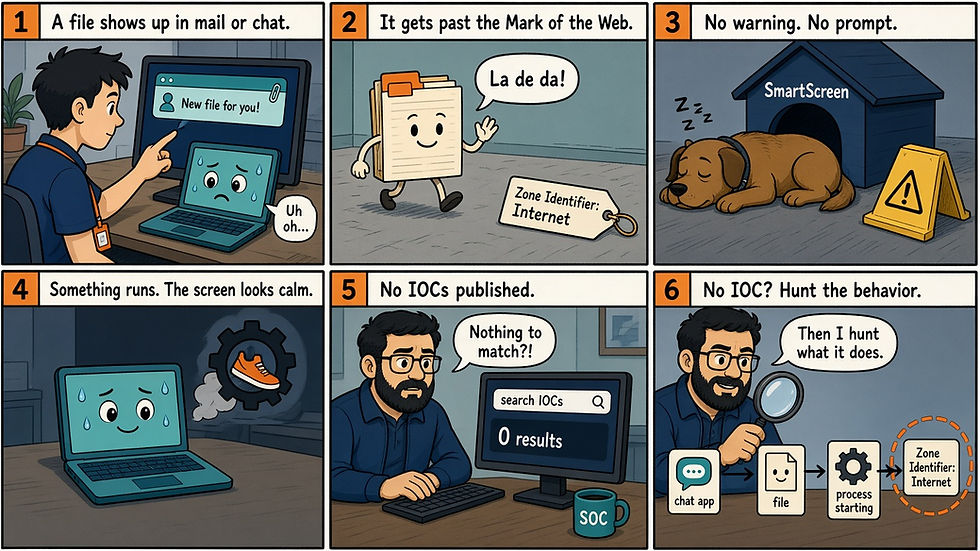
Picture a Connect Secure box, fully patched at the time, passing a clean Integrity Checker run after its AD service account has been used to search for LAPS passwords and BitLocker recovery keys. Based on what Volexity found on the device it investigated, that outcome is realistic on this chain.
Volexity reported on 13 October 2026 that a previously unknown actor it tracks as UTA0576 chained three bugs in Ivanti Connect Secure to get unauthenticated root. Two are tracked as CVE-2026-104935. The third, a privilege escalation in how dsinvoked trusts DSCache, has no published CVE and no patch yet. Exploitation of one Network Security Monitoring customer began on 3 October on a then fully patched device at 22.8R2.4 Build 19097. Defused told BleepingComputer it saw the first signs from 1 October. CISA added the CVE to KEV the same day as the advisory, with a due date of 16 October 2026.
Why this one is different
The Integrity Checker asks whether files on disk changed, and UTA0576 built the operation so the answer stays no. In Volexity's words: "The Ivanti Integrity Checker may not be able to identify device compromise."
Volexity found no web shell or backdoor because none was needed. Every command is a full re-exploitation, noisy in requests to welcome.cgi but light on disk. Patching closes the bypass and the RCE, yet anything else that lands code as cgi-server can still reach root until the escalation is fixed. Patch now, and assume the AD service account has been read.
How UTA0576 gets root without leaving a file
The first bug is an authentication bypass in CGI routing. The attacker hits the public login page at /dana-na/auth/url_default/welcome.cgi and names a different script in the X-DSCGI-PATH header, such as /home/webserver/htdocs/dana/fb/smb/wu.cgi. The appliance checks the URL to decide whether the request is allowed, then uses the header to pick the script that runs.
The RCE sits in wu.cgi. The attacker uploads a Perl script with a .zip extension, which the handler writes to /home/runtime/tmp/<MD5(filename)> and deletes once it fails the ZIP check. Parallel requests pointing X-DSCGI-PATH at that temp path try to run the script before it disappears. A win runs a Perl, Bash, then in-memory Python chain. Ivanti tracks the bypass and this RCE together as CVE-2026-104935.
That access runs as cgi-server. The third bug lets the exploit patch the in-memory copy of /home/lib/libdsplibs.so, retarget the ScriptUtil/updateOpswatSDK maintenance task at a Perl interpreter instead of /home/bin/updateOpswatSDK.pl, and have the privileged dsinvoked broker run the attacker's script as root. Afterward the DSCache entry and memory patch are restored, and /home/runtime/dlogs/debuglog and /var/log/audit/audit.log are rewritten, though Volexity says not every cleanup step is confirmed to have completed. Volexity says Ivanti is working on a fix for this escalation that will ship in a future release in the coming weeks.
What Volexity, Ivanti and CISA published
Volexity describes one victim organization, with commands and results riding the exploit's HTTPS requests. Post-exploitation went after credentials: LDAP credentials stored on the appliance, limited AD metadata, and LAPS passwords, BitLocker recovery keys and userPassword and unixUserPassword attributes read through the appliance's AD service account. The actor also used a Kerberos tool for credential testing (its Kerberoast feature was present but not seen in use), sprayed passwords, and parsed LDAP packet captures from /data/.icscap/. Volexity assesses with low confidence that the motive is criminal and with medium confidence that the tooling was built with LLM help.
Ivanti says it is aware of "exploitation in the wild affecting a limited number of customers at the time of disclosure." Affected versions are 22.8R2.4 and earlier, 25.1.2.2 and earlier, and 25.1.1.1 and earlier. Fixed versions are 25.1.1.2, 25.1.3.0, 25.1.3.1 and 22.8R2.5, and 22.7R2.14 and earlier is not affected. Versions 22.7 and 22.8 reach end of life on 31 January 2027. Ivanti rates it CVSS 8.6 (High), points customers to Volexity's indicators, and still recommends running the Integrity Checker regularly. The advisory does not cover the escalation.
CISA lists the CVE under CWE-290 (authentication bypass by spoofing). Shadowserver, via BleepingComputer, counts more than 5,500 ICS instances exposed online, which measures exposure, not compromise.
What to change this week
Upgrade every Connect Secure appliance to a fixed version before the 16 October KEV due date. 25.1.3.x runs only on the ISA4500, 6500 and 8500, and Ivanti points 22.8 users to 25.1.1.2.
Rotate the ICS AD and LDAP service account and any other credentials stored on the appliance.
Rotate LAPS passwords and check BitLocker recovery key exposure for machines that account could read (our reading of Volexity's findings), then scope its read rights down.
If you suspect a hit, capture memory before you reboot or rebuild. Volexity found the chain through memory and core dumps.
Run the Volexity YARA rules and IOCs (GitHub link in Sources) against memory captures and disk images with Ivanti or your IR partner.
Four hunts to run (test first)
These hunts use only what Volexity published, looking at traffic in front of the appliance and at your domain controllers behind it. We have not run them on live customer data. Replace every YOUR_* placeholder before you trust a zero.
Hunt in Splunk: front-door volume and the exploitation IP (test first)
(index=YOUR_PROXY_INDEX OR index=YOUR_WAF_INDEX OR index=YOUR_LB_INDEX) earliest="09/30/2026:00:00:00"
  (uri_path="*/dana-na/auth/url_default/welcome.cgi*"
   OR url="*/dana-na/auth/url_default/welcome.cgi*"
   OR "X-DSCGI-PATH")
| eval src_ip=coalesce(src_ip, src, clientip)
| eval ics_dest=coalesce(dest_ip, dest, "unknown")
| eval has_dscgi=if(match(_raw,"(?i)X-DSCGI-PATH"),1,0)
| bin _time span=1m
| stats count values(uri_path) as paths sum(has_dscgi) as dscgi_hits
        by _time, ics_dest, src_ip
| where count>20 OR dscgi_hits>0
| append [
    search earliest="09/30/2026:00:00:00" (index=YOUR_FIREWALL_INDEX OR index=YOUR_NETFLOW_INDEX OR index=YOUR_VPN_INDEX)
      (src_ip="108.165.147.64" OR dest_ip="108.165.147.64"
       OR src="108.165.147.64" OR dest="108.165.147.64")
    | stats min(_time) as first_seen max(_time) as last_seen count
            values(src_ip) as src_ips values(dest_ip) as dest_ips
            values(dest_port) as ports by index
]
| convert ctime(_time) ctime(first_seen) ctime(last_seen)
Point it at proxy, WAF or load-balancer logs that capture request headers, check field names against one known login, and tune the 20 per minute to your baseline. A proxy that strips custom headers hides the signal, so empty may mean blind.
Hunt in Kibana: welcome.cgi requests and the exploitation IP (test first)
The first search covers the front door.
url.path: *dana-na/auth/url_default/welcome.cgi*
or message: "X-DSCGI-PATH"
The second covers the exploitation IP.
source.ip: "108.165.147.64" or destination.ip: "108.165.147.64"
or related.ip: "108.165.147.64"
ECS has no standard header field, so add your custom one if you map headers. Chart results by source IP to see bursts. Look back to 30 September, when Volexity first saw that host running an OpenVPN server.
Hunt in Falcon CQL: logons from the ICS appliance behind the box (test first)
event_platform=Win
| in(field="event_simpleName", values=["UserLogonFailed2", "UserLogon"])
| RemoteAddressIP4="YOUR_ICS_IP"
| groupBy([ComputerName, UserName, event_simpleName], function=[count(), min(@timestamp, as=first_seen), max(@timestamp, as=last_seen)])
| sort(_count, order=desc)
Watch for many failed logons, or successful ones for accounts other than the ICS service account. Falcon cannot see which LDAP attributes were requested, so for LAPS and BitLocker reads use 4662 with a SACL on the domain controllers, Directory Service 1644 with expensive query logging on, or the KQL hunt. Empty often means no DC sensor or a translated address.
Hunt in KQL: front door, IP, and AD signals (test first)
let icsIp = "YOUR_ICS_IP";
let exploitIp = "108.165.147.64";
let lookback = ago(14d);
let sensitiveAttrs = dynamic(["ms-Mcs-AdmPwd","msLAPS-Password","msLAPS-EncryptedPassword",
  "msFVE-RecoveryPassword","msFVE-RecoveryInformation","userPassword","unixUserPassword"]);
union isfuzzy=true
(
  CommonSecurityLog
  | where TimeGenerated >= lookback
  | where (RequestURL contains "/dana-na/auth/url_default/welcome.cgi"
           and (AdditionalExtensions contains "X-DSCGI-PATH"
                or Message contains "X-DSCGI-PATH"))
        or SourceIP == exploitIp or DestinationIP == exploitIp
  | project Timestamp=TimeGenerated, DeviceName, SourceIP, DestinationIP,
           RequestURL, Message, Signal="proxy_or_firewall"
),
(
  DeviceNetworkEvents
  | where Timestamp >= lookback
  | where RemoteIP == exploitIp or LocalIP == exploitIp
  | project Timestamp, DeviceName, LocalIP, RemoteIP, RemotePort,
           ActionType, Signal="device_network"
),
(
  IdentityQueryEvents
  | where Timestamp >= lookback
  | where IPAddress == icsIp
      or AccountUpn has "YOUR_ICS_AD_SERVICE_ACCOUNT"
      or AccountName has "YOUR_ICS_AD_SERVICE_ACCOUNT"
  | where Query has_any (sensitiveAttrs)
        or tostring(AdditionalFields) has_any (sensitiveAttrs)
  | project Timestamp, AccountName, AccountUpn, IPAddress, QueryType, Query, QueryTarget,
           DeviceName, Signal="identity_query"
),
(
  SecurityEvent
  | where TimeGenerated >= lookback
  | where EventID in (4625, 4768, 4769, 4771)
  | extend SrcIp = replace_string(IpAddress, "::ffff:", "")
  | where SrcIp in (icsIp, exploitIp)
  | project Timestamp=TimeGenerated, Computer, EventID, IpAddress,
           TargetUserName, Signal="ad_auth"
)
| sort by Timestamp asc
The attribute names are our reading of the standard LAPS and BitLocker schema, not strings Volexity published. Defender for Identity logs only some LDAP searches, so a zero there is weak evidence. Run it in Sentinel or the unified Defender portal with the Sentinel workspace connected, because standalone Defender XDR quietly returns nothing for CommonSecurityLog and SecurityEvent.
Interpret before you escalate
Finding | Benign read | Escalate when |
Burst of requests to welcome.cgi | Normal login load | Parallel requests seconds apart, or any X-DSCGI-PATH |
URL path and X-DSCGI-PATH disagree | None we know of from outside the appliance | Any mismatch Volexity described; attackers may find other paths |
Traffic to or from 108.165.147[.]64 since 30 September 2026 | None we know of | Any hit |
ICS AD account reading LAPS, BitLocker or password attributes | None in normal operation | Any such query; rotate and scope the account |
4768, 4771 or 4625 from the ICS IP in bursts | Normal VPN auth noise | Spray-shaped failures you cannot explain |
None | ||
A .icscap directory under /data/ or /home/root/data/ | Rare, inspect first | Capture files or a renamed tcpdump inside |
DSCache ScriptUtil/updateOpswatSDK pointed at a Perl interpreter | None | Any hit; capture memory before reboot |
Clean Integrity Checker result | Disk files look unchanged | Treat as not checked yet; hunt off-box and in memory |
Empty results across all four hunts | Nothing matched | Confirm header logging, DC coverage and account naming first |
Sources
Volexity, A Series of Unauthenticated Events: Chained Exploitation of Ivanti Connect Secure Zero-Days, 13 October 2026: https://www.volexity.com/blog/2026/10/13/a-series-of-unauthenticated-events-chained-exploitation-of-ivanti-connect-secure-zero-days/
Volexity indicators (iocs.csv and rules.yar): https://github.com/volexity/threat-intel/tree/main/2026/2026-10-13%20Ivanti
Ivanti advisory, Security Advisory Ivanti Connect Secure CVE-2026-104935: https://hub.ivanti.com/s/article/Security-Advisory-Ivanti-Connect-Secure-CVE-2026-104935
CISA Known Exploited Vulnerabilities Catalog: https://www.cisa.gov/known-exploited-vulnerabilities-catalog
What This Means for Your Team
On this chain, a green Integrity Checker result does not mean the box is clean. The evidence lives in front of the appliance, behind it on the domain controllers, and in memory. Upgrade this week, rotate the service account and what it could read, and watch for the escalation fix. Ivanti calls exploitation limited and public reporting describes one victim, but treat your estate as unchecked until the hunts return on logging you trust.
Inception Protection
Inception Protection is our managed detection and response service, and it works with the Microsoft licenses you already have. In our experience, VPN and edge compromise often shows up first in directory and sign-in activity behind the appliance, not on the appliance disk. We help you pull those signals into one place and start containment with you. You still make the patch and rotation calls.
Inception Foresight
If you want to see how well your Microsoft environment would surface activity like this, try the free Inception Foresight M365 Assessment: https://www.inceptionsecurity.com/m365assessment. You can also follow Inception Security on LinkedIn and @inceptionsec on X.